Sessions
A session is a continuous conversation with the agent: the message history, the actions it took, and the working state. It's the unit you open, close, and resume.
The lifecycle of a session
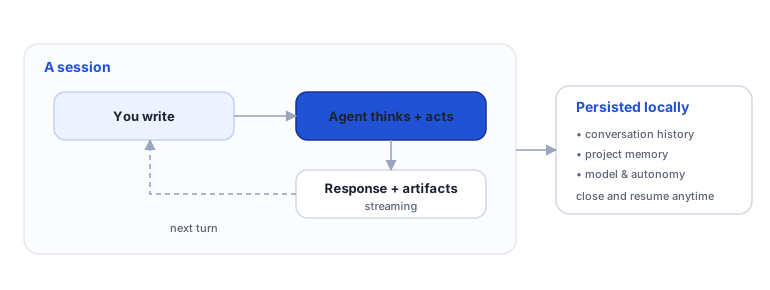
Each turn is a round: you write, the model reasons, any tools run (edit files, commands, skills), and the response streams back. The session accumulates these turns.
Context and compaction
The model has a finite "context window." As the conversation grows, Imaginne manages context by limit, not by number of turns: when the context approaches the limit, it automatically compacts older parts to keep the conversation flowing without losing the thread.
- You can track context usage in the status bar (Desktop/TUI show
ctx:used/limit). - Clearing the context starts the reasoning fresh (the next call to the model "forgets" the history) without erasing the visible transcript, the memory, or your settings.
- Clearing the conversation discards the ephemeral history but preserves the persistent state (workspace, memory, skills, model, autonomy).
Where the session lives
- Local surfaces (Desktop, TUI, VS Code). The session is persisted in local files (with a local index). You can close the app and resume the conversation exactly where you left off. On Desktop, each project can have several sessions; in the terminal, there's a local catalog of sessions (
/sessions). - Browser chat. The session lives on the server, tied to your organization and your user, and is restored when you reopen the conversation. Hosted sessions expire after periods of inactivity.
Background runs (web chat)
In the web chat, the run belongs to the server, not to your browser tab. That changes what you can do while a response is in flight:
- Closing the tab, losing your connection, or switching machines cancels nothing. When you reopen the conversation, whatever was produced while you were away is already there.
- You can work in several conversations at once. Switching conversations doesn't interrupt the previous run; a status dot in the list shows what's running, queued, done with a new result, or failed.
- The cap is 10 active runs per user — beyond that, the chat asks you to wait for one to finish.
- To actually stop a run, use the stop button in that conversation's composer.
The local surfaces work differently: the agent runs inside your app, and you wait for or cancel the current turn before switching sessions.
Resume, rename, archive
The surfaces offer equivalent session operations:
| Action | Desktop | Terminal (TUI) | Web chat |
|---|---|---|---|
| List sessions | session menu (header) | /sessions | sidebar + search (⌘/Ctrl+K) |
| New session | + New session | /sessions new <title> | + New chat |
| Switch session | click in the list | /sessions switch <id> | click in the list |
| Rename | Rename current | /sessions rename <id> <title> | ⋯ → Rename menu |
| Archive | Archive current | /sessions archive <id> | ⋯ → Archive menu |
| Organize into folders | — | — | Projects |
On the local surfaces, you can't switch sessions while the agent is responding — cancel or wait for it to finish first; and you can't archive the active session. In the web chat that restriction doesn't apply: the run continues on the server while you open another conversation.
What the session keeps
Beyond the messages, the session preserves your working settings: the selected model, autonomy, execution mode, and verbosity level. When you resume, you find everything as you left it.
See also
Was this page helpful?
Report a problem on this pageDo not send passwords, keys, tokens, or customer data.