Identity & login
Imaginne has one login and one session. You sign in once, through the browser, with your organization's account — and that works for every surface.
The login flow
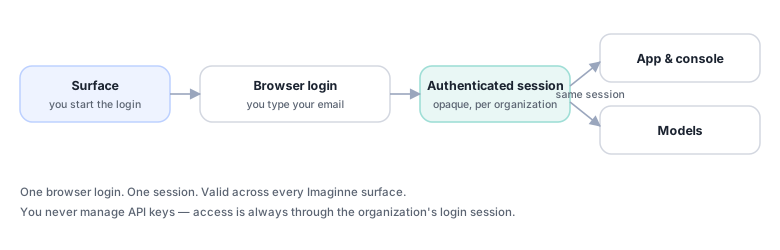
- In the surface, you start the login.
- The browser opens your organization's login page. You enter your email — you don't need to supply the organization's identifier; it's discovered from the email.
- After authenticating, an authenticated session is established securely on the surface.
- That same session works across every Imaginne interface — you don't log in again on each one.
The session credential is never displayed in the interface — you only see a summary (name, email, validity).
One session, everywhere
- The same session authenticates you across every Imaginne interface — identity, organization policies, and access to models.
- The session is bound to your organization and cannot be reused outside it.
- The session's validity is checked continuously, so a revoked session stops working quickly.
- No "allow on error": if the session isn't valid, the request is refused.
There's no vendor-key setup for the user. Creating a user does not generate an API key — access is always through the organization login.
Login by surface
| Surface | How to sign in | Sign out |
|---|---|---|
| Desktop | Sign in on the home screen (or /login) | /logout |
| Terminal (TUI) | imaginne login (or /login inside the app) | imaginne logout / /logout |
| VS Code | /login in the chat (or the Imaginne: Login command) | Imaginne: Logout |
| Web chat | Sign in button | Sign out |
To check the current session, use /whoami (Desktop/TUI/VS Code) or imaginne whoami — it shows name, email, organization, and validity, without displaying the session credential.
Long sessions
The surfaces silently renew the session in the background, so an app left open for a long time stays valid and picks up organization/role changes without a new login. If the session expires, you get a prompt to sign in again.
See also
Was this page helpful?
Report a problem on this pageDo not send passwords, keys, tokens, or customer data.