Skills — overview
A skill is a packaged capability the agent invokes when it's relevant: "build a presentation," "read a PDF," "generate a proposal from a company template." This section is the guide for authors (the people who create skills) and admins (the people who publish and govern them). For the mental model — how the agent decides to invoke a skill — see Skills (concept).
A skill bundles three things into one folder: a manifest (metadata, permissions, the secrets it needs), a prompt (instructions for the agent) and, optionally, scripts (the code that does the actual work — for example, generating a .pptx).
Lifecycle
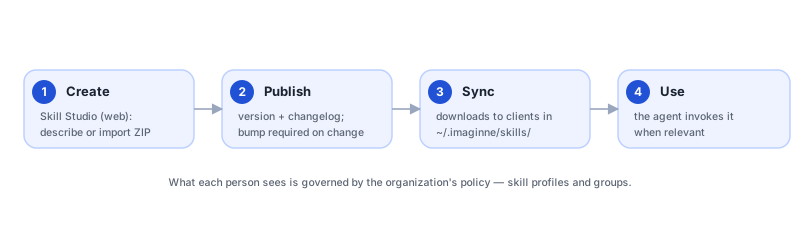
A skill's path through Imaginne always follows the same stages:
- Origin. The skill comes from one of the three sources below (bundled, organization, or personal).
- Authoring. You define the manifest and the prompt — in Skill Studio (web) or in local files.
- Publishing. The skill gets a version (semver) and a changelog and enters the organization's catalog. See Publish and version.
- Governance. The skill is assigned to profiles, which determine which users receive it. See Skill governance.
- Sync. At the start of each session, clients download the skills you have access to into
~/.imaginne/skills/and remove the ones you've lost access to. - Invocation. You describe what you want; the agent decides whether — and which — skill to use.
Where skills come from
| Origin | What it is | Where |
|---|---|---|
| Bundled | Document skills (docx, excel, pdf, ppt_skill) that ship with the product and are installed automatically. | Embedded in Desktop and in the web chat image. See Bundled skills. |
| Published by the organization | Process skills created by your company, assigned via profiles. | The org catalog, managed in Skill Studio. |
| Personal / project | Skills you drop into ~/.imaginne/skills/ or the project's .imaginne/skills/. | Your machine. |
Organization sync manages the published skills in ~/.imaginne/skills/. Bundled skills and your personal skills coexist with them.
Skill ≠ command ≠ file mention
Don't conflate the three concepts — they show up in different ways across the surfaces:
| Type | How it appears | What it is |
|---|---|---|
| Skill | the agent invokes it when relevant | A capability the model uses when it makes sense. It's the subject of this section. |
| Command | /something | An interface (host) command, like /model or /clear. It doesn't go through the model. |
| File mention | @file | A reference to a file in your workspace — the agent will read it. Skills are invoked like skills (by the model), not by a prefix. |
You don't "run" a skill manually — you describe the goal and the agent picks the tool. The organization controls, via policy, which skills make it into the list presented to the model.
Execution modes
Every skill declares how it runs on the machine: local_plain (open, transparent files) or local_protected (verified content, extracted into a temporary folder and removed). There's no "remote server" mode — the runtime is always local on the app surfaces. See Execution modes.
The secrets a skill needs
A skill that talks to an internal system (a CRM, a corporate API) declares the secrets it needs via required_env. The organization registers those secrets once and Imaginne injects only the declared names, only for that execution. See Env-secrets (author) and Env-secrets (admin).
Where to start
The folder structure and the two manifest schemas, with real examples.
Open →Bundled skillsdocx, excel, pdf and ppt_skill — what each one does.
Open →Create in Skill StudioFrom scratch or by conversation, right in the web console.
Open →Import via ZIPThe required layout, the limits, and the step by step.
Open →Publish and versionSemver, changelog, rollback, and how clients receive it.
Open →Execution modeslocal_plain vs local_protected, integrity, and when to use each.
Open →Env-secrets (author)Declare and consume secrets with no leakage between skills.
Open →TroubleshootingThe most common skill errors and how to resolve them.
Open →Was this page helpful?
Report a problem on this pageDo not send passwords, keys, tokens, or customer data.