BYOK — model keys
BYOK (Bring Your Own Key) lets the organization use its own model keys instead of the platform's shared key. The keys belong to the organization (not to each user): a user with permission consumes the paid model using the organization's key. You manage BYOK at /org/byok.
How it works
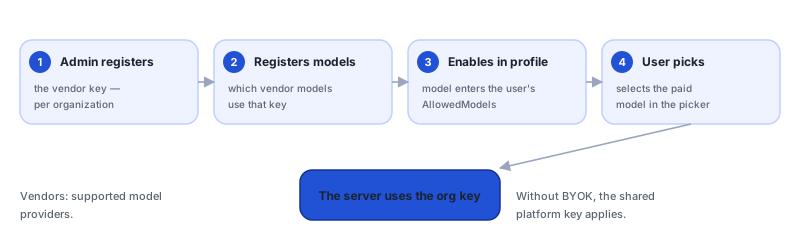
The key never reaches the client. As throughout the architecture, only the platform (in the cloud) talks to the model provider — and it's the one that uses the organization's key to route calls on behalf of authorized users.
Supported vendors
| Vendor | Key prefix |
|---|---|
| anthropic | sk-ant- |
| openai | sk- |
| dashscope | sk- |
Create a key
Use create and provide:
- Vendor — anthropic, openai, or dashscope.
- Label — a label to identify the key in the list.
- Key value — the provider credential (with the correct prefix above).
Once saved, the key value is not displayed — the list shows only the last 4 characters for verification. Store the original credential securely; to replace it, use Rotate (below).
Manage models
Registering a key is not enough for the models to appear. In Manage models you register that vendor's models:
- The model's identifier on the provider.
- A display name.
- The supported max tokens.
To be used, a BYOK model has to be registered on the key (Manage models) and on the allowed-models list of the profile/policy. If the key exists but no model has been registered, the system reports that no model has been registered.
Health check, rotation, and deletion
| Action | Effect |
|---|---|
| Health check | Tests whether the key is valid and responding at the provider. |
| Rotate | Replaces the key value (the new value is also write-only). Use it when rotating credentials. |
| Delete | Removes the key from the organization. |
Without BYOK
If the organization does not configure BYOK, the platform's shared key applies: the default models (nnumbers / nnumbers-code) and automatic routing work normally, under the organization's policy. BYOK is for those who want to bill/operate with their own account at the provider or enable vendor-specific models.
Relationship with the policy
The allowed-models list is resolved by governance. BYOK supplies the models that can enter that list, but it's the policy that decides who sees what. Treat BYOK as the credentials side, and the allowed-models list as the permissions side.
See also
Was this page helpful?
Report a problem on this pageDo not send passwords, keys, tokens, or customer data.