EC2 credentials
The procedure in this walkthrough uses POSIX-compliant tooling. Windows users therefore need to install utilities that bring POSIX support to Windows (for example CygWin), which is outside the scope of this document.
To create an EC2 credential you need to:
- Download the RC file (see Downloading the environment configuration file).
- Apply the access environment variables contained in the file (see Setting the environment variables)
- Obtain a temporary access token (see Creating an access token from application credentials or Creating an access token from user credentials)
- With the access token in hand, create the EC2 credentials.
Creating EC2 credentials
To obtain the EC2 credentials, run the following command:
curl -s -X POST -H "Content-Type: application/json" \
        -H "X-Auth-Token: $OS_TOKEN" \
        -d '{"tenant_id": "'$OS_PROJECT_ID'"}' \
        "${OS_AUTH_URL}/v${OS_IDENTITY_API_VERSION}/users/${OS_USER_ID}/credentials/OS-EC2" | jq .
The output looks something like this:
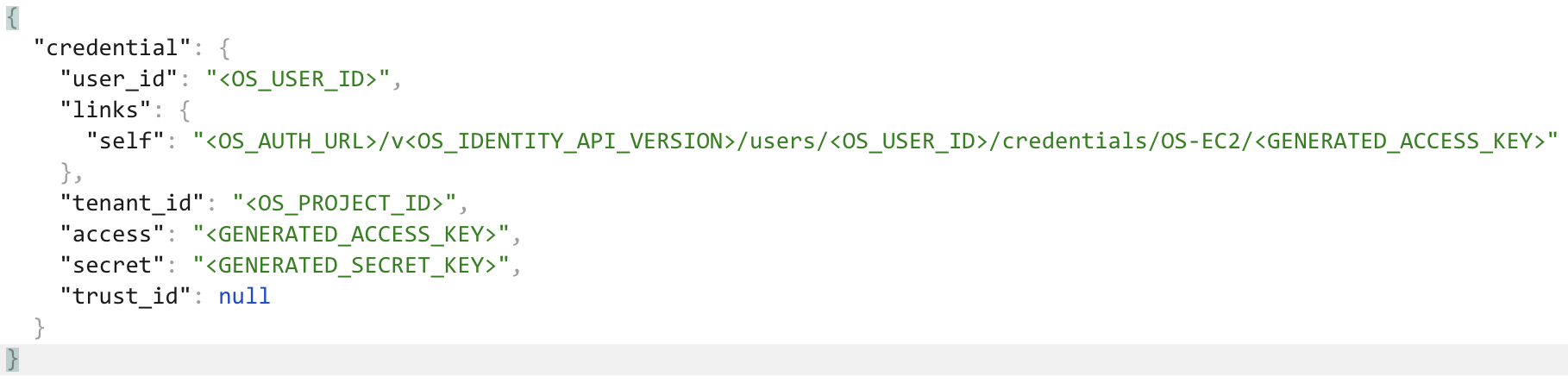
From the payload above, use the access and secret fields. They correspond to ACCESS KEY and SECRET KEY EC2 respectively.
Deleting EC2 credentials
To delete the EC2 credentials, use the DELETE verb instead of the POST used to create them, together with the token and the link returned in the self field of the creation payload, as shown below:
curl -s -X DELETE -H "Content-Type: application/json" \
        -H "X-Auth-Token: $OS_TOKEN" \
        -d '{"tenant_id": "$OS_PROJECT_ID"}' \
        "${OS_AUTH_URL}/v${OS_IDENTITY_API_VERSION}/users/${OS_USER_ID}/credentials/OS-EC2"
Walkthrough: Creating secrets in the NNumbers Cloud KMS
Next steps
Was this page helpful?
Report a problem on this pageDo not send passwords, keys, tokens, or customer data.